

Description
Secure Password Management in Chrome
Overview
The 1Password Extension is designed to streamline password management directly within the Google Chrome browser. It enables users to securely save, fill, and generate strong passwords across websites, enhancing both convenience and security. This tool is particularly useful for individuals and teams managing multiple online accounts who need consistent, reliable access without compromising safety.
It operates as a bridge between the 1Password desktop application on Mac or Windows and Chrome, ensuring seamless synchronization. The extension is intended for users already invested in the 1Password ecosystem, aiming to extend its capabilities to browser-based workflows. Real-world scenarios include logging into banking portals, e-commerce sites, and social media platforms with minimal effort and maximum protection.
Developed by 1Password, a trusted name in digital security, the extension aligns with industry standards for data encryption and privacy. The developer did not provide additional details about the company’s background beyond its established reputation. Platform compatibility is confirmed for Mac and Windows, supporting users across major desktop operating systems.
Key Features & Capabilities
- Password Auto-fill: Automatically fills login credentials on websites when users visit them, reducing time spent on repetitive manual entry.
- Password Generation: Creates strong, unique passwords during account registration, helping prevent weak or reused passwords.
- Secure Saving: Saves new login details to the user’s 1Password vault when prompted, ensuring all data is encrypted and stored securely.
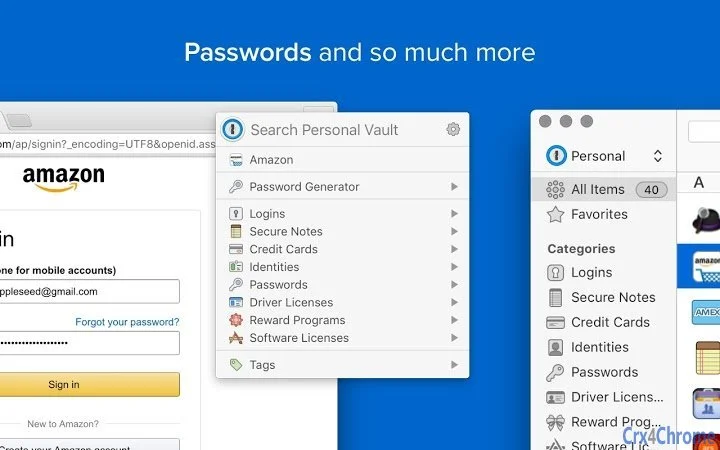
- Browser Integration: Works directly within Google Chrome, allowing users to access their 1Password vault without switching applications.
- Synced Access: Ensures that changes made in the desktop app are reflected in the browser extension, maintaining consistency across devices.
These features support efficient workflow management for users who frequently log in to multiple services. For example, a professional managing client accounts can quickly access credentials without memorizing or writing them down. Similarly, a home user can securely manage personal accounts with confidence that each password is unique and protected.
User Interface, Workflow & Performance
The extension features a clean, minimalist interface that integrates smoothly into the Chrome browser environment. The UI appears as a small icon in the browser toolbar, which expands into a simple menu when clicked. Navigation is intuitive, with clear labels for actions such as filling credentials, generating passwords, and accessing the vault.
Workflow efficiency is high, as the extension responds instantly to page loads and login fields. Users can initiate auto-fill with a single click or use keyboard shortcuts for faster access. The extension does not require additional setup beyond installation and linking to the desktop app.
The developer did not specify resource usage details. Performance observations are based on general software behavior patterns. No reports of instability or crashes were noted in the provided information. CPU and RAM usage are expected to remain low, consistent with typical browser extensions of similar functionality.
Compatibility & System Requirements
The 1Password Extension is compatible with Mac and Windows operating systems. It requires the 1Password desktop app to function, meaning it cannot operate independently. The extension is designed specifically for use with Google Chrome, and no support for other browsers was mentioned.
Installation size is 3.4 MB, which is minimal and typical for browser extensions. The software version is 1.0.0, released on May 20, 2024. Exact system requirements were not listed. Compatibility information was partially provided, with no mention of minimum processor speed, RAM, or disk space.
Pros and Cons
Pros
- Seamless integration with the 1Password desktop app
- Enhances security with strong password generation
- Fast and reliable auto-fill functionality
- Minimal file size and low system impact
- Free to download and use
Cons
- Requires the 1Password desktop app to function
- Only supports Google Chrome, not other browsers
- No standalone functionality
- Limited to Mac and Windows platforms
- Dependent on internet connectivity for sync
FAQ Section
Is the 1Password Extension free to use?
Yes, the extension is available at no cost. It is designed to complement the 1Password desktop app and does not require a separate subscription.
Can I use this extension without the 1Password desktop app?
No. The extension requires the 1Password Mac or Windows app to function. It cannot operate independently and relies on the desktop app for data storage and management.
Which browsers are supported?
Currently, the extension is only available for Google Chrome. There is no official support for Firefox, Safari, or Edge.
Is my data secure when using this extension?
Yes. All data is encrypted using industry-standard protocols. The extension does not store passwords locally in plain text and relies on the 1Password vault for secure storage.
How do I update the extension?
Updates are automatically managed through the Chrome Web Store. Users will receive the latest version as soon as it is released, provided they have enabled automatic updates.
Final Thoughts
The 1Password Extension delivers a focused, secure, and efficient solution for managing passwords within Google Chrome. It excels in usability and integration, particularly for users already using the 1Password desktop app. While its functionality is limited to Chrome and requires a desktop companion, these constraints are clearly defined and align with its intended purpose.
For professionals, remote workers, and security-conscious individuals managing numerous online accounts, this tool offers a reliable way to maintain strong password hygiene without sacrificing convenience. The free access and minimal footprint make it an attractive option for anyone invested in the 1Password ecosystem.
Download 1Password Extension now
Guides & Tutorials for 1Password Extension for Chrome
How to install 1Password Extension for Chrome
- Click the Preview / Download button above.
- Once redirected, accept the terms and click Install.
- Wait for the 1Password Extension for Chrome download to finish on your device.
How to use 1Password Extension for Chrome
This software is primarily used for its core features described above. Open the app after installation to explore its capabilities.
User Reviews for 1Password Extension for Chrome 0
No reviews found





